AI PCs and the Future of Knowledge Work: A Librarian’s Take

A few days after leaving corporate life, I treated myself to a new machine, the HP OmniBook Flip X with Ryzen 5 AI. Sleek, quiet, and surprisingly fast. But what really caught my attention was not the specs; seriously speaking, I have a Gaming Rig that can withstand 4K without a fuss. What made me purchase was the word on the box: AI PC

First thought is that… this may just be a marketing fluff. What is this AI on the box… Ridiculous, I say. Then I started to do some research about it, and now I understand the local AI features which are: Text generation, summarisation, real-time transcription (ini sgt penting, untuk orang yg ada macam² nak buat). These are all running offline tau, without the need to connect to the Cloud Service. Read: neural processing units (NPUs).

What Makes an AI PC Different

AI PCs are equipped with neural processing units (NPUs), hardware designed to accelerate tasks like summarisation, transcription, image recognition, and real-time language translation. Unlike traditional PCs, AI PCs can run these tasks locally, without relying on cloud servers. Think of it as a mini brain that handles AI tasks directly on your device.

What does it mean??? Well, with AI PC you can get:

  1. Faster performance for AI-heavy tasks
  2. Lower power usage (dia process pakai NPU bukan processor, so kurang la penggunaan kuasa bateri)
  3. Privacy Saudara!!! sebab… your data stays on your PC – you tak upload data dekat Cloud. (bukan sahaja Smart computing, ianya juga adalah responsible computing)

From Searching to Synthesising

Back when I managed library systems, the focus was always on finding, indexing, cataloguing, and providing access. AI PCs flip that dynamic. Now, I can synthesise. My laptop helps me summarise PDFs, extract insights from reports, and even generate blog drafts like this one, instantly, without connecting to the cloud. (yeah, saya pakai AI untuk bantu saya tulis ni). Disclaimer: It’s not replacing thinking; it’s accelerating it.

This new environment demands a new literacy, which is AI literacy. Knowing how to ask the right question, provide the right context, and verify the output. For librarians and knowledge workers, this is familiar territory. We have always been intermediaries between questions and answers, data and decisions. Now the dialogue just happens with an AI model instead of a database.

AI PCs and the Personal Knowledge Ecosystem

I see AI PCs as the first step toward a personal knowledge ecosystem, as each device is tuned to its user’s habits, context, and domain. Imagine engineers, analysts, or researchers running secure, local AI models that learn their preferences and workflows.

For knowledge centres, this sparks a new mission: from managing collections to enabling connections, from static access to dynamic insight. The librarian’s role has evolved from gatekeeper to guide. With AI PCs, we are not just organising information, we are designing experiences.

Baik… Cuba bayangkan…

  1. During workshop, training atau sembang² biasa, AI PC can transcribe live discussions and then extract action items. This is a productivity improvement with security and privacy mode enabled.
  2. You now have your own personal assistant to summarise your unread emails. Pembantu peribadi AI ini boleh draft to-do list, and buat reminder for whatever important meeting (kot la ada interview masuk kerja di kala menjadi YB (Yang Bersara).
  3. Paling best… bantu you draftkan blog post macam ni – Git gud with AI — not at being faster, but at being smarter.

A Librarian’s Reflection

Leaving the corporate library after twelve years has given me a new perspective. I am no longer managing systems, but I am still managing knowledge, in my own small way. My new HP Omnibook Flip X reminds me that the boundary between human and machine knowledge is getting thinner.

AI PCs will not replace librarians as Natural Intelligence, even if it is slow, it is still able to bring judgment, ethics, and context, which AI is currently not able to, as they lack human judgment, ethical reasoning, and contextual awareness.

As I pivot into new creative and professional directions, I carry this belief:

We are not being replaced. We are being reimagined.
30+30+30 = 90 saat!!!

30 + 30 + 30 = 90. Itulah perkisahannya pada hari ini. Setelah tidak beberapa nak berjaya flash router lama saya dgn DD-WRT, maka teringatlah akan saya tentang 30+30+30 ini. Itulah dia kepentingan berguru dengan orang² yang lebih bijak dari kita. Iya benar… Mungkin kita rasa kita bijak. Tapi… hendaklah kita ingat sebijak mana pun kita. Sayugia kita sedar ada yang lebih bijak dari kita. Kebijaksanaan seseorang tidak terletak kepada ijazah atau skroll yang disandang, akan tetapi kebijaksanaan itu terletak kepada yang empunya diri. Ini perkara benar, saya ada kawan yang tidak ada ijazah… tapi dia punya gaji dan pendapatannya lebih dari saya.

Baik kita terus kepada cerita kita yang asal iaitu 30+30+30. Pada setiap router samada ADSL router atau mana2 jenis router pastinya terdapat butang reset di dalam pelbagai bentuk. Butang ini bisa mengembalikan router tersebut kepada default settings persis router yang baharu keluar dari kilang dan bebas dari apa² settings yang pernah dibuat.

Selalunya butang ini digunakan apabila pengguna

  1. Terlupa kata laluan router
  2. Router menjadi tak betul
  3. Saja nak reset sebab nak jual
  4. Saja nak reset sebab suka²

Namun kadang² butang reset tersebut tidak memberi apa² kesan kerana tekan tak cukup lama atau punca masalah yang memerlukan butang reset ditekan lama sedikit dan macam² hal lagi. Di dalam Dunia IT, Network adalah yang paling majik sekali. Macam² hal yang pelik² kebanyakan berasal dari Network.

Oleh kerana tekan sekejap tidak memberi kesan, maka Dewa² network telah menggariskan satu panduan apabila kita nak Har Reset Router kita. Dari sinilah lahirnya 30+30+30 ini.

30 Saat yang Pertama
Di saat router tersebut masih bernyawa dan mempunyai aliran elektron eletrik (ketika masih switch on), butang reset itu ditekan selama 30 saat.

30 Saat yang ke-Dua
Kemudian apabila sudah lengkap 30 Saat yang pertama tadi, kita tutup suis punca router sambil menekan butang reset itu selama 30 saat.

30 Saat yang Terakhir
Apabila sudah lengkap kitaran yang kedua, kita mulai dengan 30 saat yang terakhir dengan membuka kembali suis router tersebut dimana butang reset masih lagi ditekan.

Pendek kata selama 90 saat, butang reset itu ditekan. Memang nampak mengarut tapi itulah majik dia. Akhirnya saya berjaya instal DD-WRT di router TP-LINK TL-MR3420.

Maka itulah dia 30+30+30 = 90 saat.

Steve Jobs telah pergi…

[img_assist|nid=1459|title=|desc=|link=node|align=none|width=400|height=250]

Co-Founder Apple Inc. telah pergi buat selamanya setelah bertahun berjuang melawan kanker. Beliau telah banyak membuat sumbangan kepada dunia komputer terutamanya gajet² kecil yang mmg cantik serta menawan. (Baca: iPhone, iPad dan iPod). Semua orang tahu apa itu Apple dan siapa Steve Jobs kepada Apple.

Takziah kepada pengguna Apple seantero dunia.

Image Source : Apple Inc. (http://www.apple.com)

Komputerku @ Dewa Jingga rosak

Salam

Hari ini merupakan hari yang tidak best. Dewa Jingga sudah tidak bernyawa lagi. Macam2 dugaan yang muncul tiba. Tayar pancit, gas habis, sara meragam dan yang paling unggul sekali ialah Dewa Jingga bertukar menjadi tukun.

Ini merupakan perkara yang memang tak seronok. Munmon tanpa pcnya adalah seumpama seekor hamster tanpa roda lariannya. Nasib baik ada android… Tapi masih tidak gah dan tidak memadai untuk melakukan tugas2 hakiki.

Apa barang browse lifehacker guna mobile device. Tak seronok main cityville dgn screen kecik [at least playable la kan dari aipon :-P]. Terbantut semua aktiviti harian pada hari ini. Mungkin masanya telah tiba untuk sesuatu yang baharu ;-). Tapi… Mana mungkin…

Saya nak jemur kain. Mungkin ini adalah petunjuk dariNya…

Virus ke? False alarm kot!!!

Salam Sejahtera

Semenjak kembali ke Windows 7 ini, saya terpaksa berhati-hati ketika membuka file atau program yang dimuat-turun dari internet. Dahulu, semasa menggunakan Ubuntu, saya senyum sahaja. Sayang bini punya pasal, Windows pun… Windows la. Tapi itu tidak bermakna saya akan terus meninggalkan dunia Linux. Ini kerana, Linux adalah keperluan asas untuk saya, terutamanya di pejabat.

Apabila menggunakan Windows, adalah wajib untuk install perisian Anti-Virus. Tidak kira, sehebat manapun kita, anti-virus adalah keperluan wajib untuk pengguna Windows. Kerana yang hebat selalu alpa dan lalai apatah lagi yang biasa2 sahaja. Virus, bergantung kepada jenisnya mampu membotakkan kepala anda dan menyusahkan kehidupan anda seharian.

Oleh itu, sebelum terkena, haruslah kita beringat. Anti-Virus pun ada baik dan buruknya. Terlampau sensitif menyakitkan hati, terlampau pasif membahayakan kehidupan. Hmmm. Seksa beb. Siapala si Dungu yang cipta virus neh? Baru-baru ini, sebuah update untuk McAffee telah menyebabkan Windows untuk reboot secara loop. Mari kita lihat apa yang berlaku:

<?php
$variable1 = “restart computer”;
$variable2 = reboot($variable1);
do {
echo “{$boot[‘boot’]} <br />”;} while ($boot= mysql_fetch_assoc($reboot));
?>

Rupanya virus definition McAffee telah identify svchost.exe sebagai virus dan didelete dari komputer. Jahanam!!! Engadget melaporkan:

“DAT update 5958 deletes the svchost.exe file, which then triggers a false-positive in McAfee itself and sets off a chain of uncontrolled restarts and loss of networking functionality.”

So amacam sekarang? File sudah di download. Nak run ke tidak?

Nasib baik ada satu application seperti VirusTotal yang boleh tolong tengokkan file tersebut. Kita uploadkan file tersebut dan VirusTotal akan bandingkan dengan beberapa antivirus yang terkenal. Kadang-kadang hanya satu daripada 40 antivirus yang mengesan file tersebut adalah virus… Ini maknanya.. bukan virus la.

Oleh itu pandai2lah kita menggunakan akal kita serta naluri kita untuk menjaga keselamatan data kita.

Adobe PDF Reader vs Foxit Reader

Salam Sejahtera dan Salam

Mungkin ramai diantara kita yang tahu akan kewujudan Foxit Reader ini. Mungkin ramai yang tensi dengan kelembapan komputer kita di kala, membuka file PDF dari browser. Kelembapan komputer kita akan terserlah apabila Adobe Reader yang bertanggungjawab membuka file2 PDF ini. Sungguh sembab dan kurang sopan Adobe Reader ini. Kadang-kadang, PC kita yang gagah pon akan menjadi lembab kerana Adobe Reader sedang berjalan.

Setelah kajian dibuat, saya membuat kesimpulan bahawa Foxit Reader adalah 100x lebih baik daripada Adobe PDF Reader. Kajian yang dijalankan menggunakan 2 buah Komputer Meja (Desktop PC le) dengan speknya:

  • Pentium Core2 Duo 2.5GHz
  • Ram 4G
  • Windows XP Pro SP3
  • Mozilla Firefox

Adobe Reader mengambil masa 5 saat untuk membuka sebuah PDF 10MB. Manakala Foxit Reader hanya memerlukan 3 saat.
Winner : Foxit Reader

Cubaan seterusnya adalah membuka sebuah artikel Nursing dari Journal Cancer Nursing. Size 500kb. Adobe Reader membuka dlm masa 7 saat. Foxit Reader 2 saat.
Winner : Foxit Reader

Saiz installation file Adobe Reader adalah 40MB dan Foxit Reader hanya 5MB.
Winner : Foxit Reader

Adobe Reader selalu mempunyai update dan semuanya agak besar. Foxit reader jarang sekali mempunyai update.
Winner : Foxit Reader

Dan akhir sekali, Foxit Reader tidak membuatkan PC anda lembab. Dengan Adobe Reader, PC yang gagah pon akan menjadi lembab.
Winner : Foxit Reader

Oleh itu, secara keseluruhannya, Foxit Reader adalah lebih bagus daripada Adobe Reader. Marilah anda semua beralih ke Foxit Reader.

Share files with Dropbox

dropbox-share

Message from Dropbox Team

Did you know that you can use Dropbox to share files and collaborate on projects? You can do this using Dropbox shared folders:

  • Shared folders are folders in your Dropbox that sync to other Dropbox users
  • Share lots of files at once (size doesn’t matter)!
  • Receive notifications whenever changes are made by others

Sounds better than emailing files to each other, right? Click here to get started.

That dreaded IE6…

Throm-ka

Perhaps, web developers worst nightmare is Internet Explorer 6. I usually don’t give a damn to this issue. All troubles while developing site and designing web page, CSS issues, div placement with IE6, I will choose to create a friendlier version for IE6. Forget the those standards and try to make that page appear correctly in IE6. Why? One reason : some users still refuse to change. They would rather spend their time with that ageing IE6.

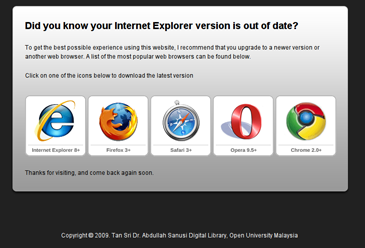
Bah! But today, after so sick with, real sick with IE6, I have decided to force users to upgrade their IE6 or you are not welcome. It is so hard to create one page that is friendly with IE6 but looks horrible with other browsers. NO! NO! NO! NO!. That’s not gonna happen today.

I have put a code to ask users to upgrade their Internet Explorer 6. I wonder, why users are still tagged with that stupid browser. What a nonsense! I mean, how on earth IE6, the world’s most Worst Tech Products still being used by the general public? Don’t the users know how bad is IE6.

  • As of January 10, 2009, Secunia reports 142 vulnerabilities in Internet Explorer 6
  • Security advisory site Secunia counted 20 unpatched security flaws for Internet Explorer 6, many more and older than for any other browser
  • IE6 does not fully support CSS version 2, unlike most browsers which in turn means web developers must use “hacks” or workarounds so IE6 will display web pages correctly.
  • Internet Explorer 6 is evil – pure and simple.